
Your CFO wants numbers. Your CEO wants a business case. And you need to justify every dollar before you can move forward with an HR software purchase.
You’re in the right place. This article breaks down exactly how to calculate the ROI of HR software, what the realistic financial gains look like for a small or mid-sized business, and how to build the internal business case that gets the green light.
We’ve also compiled the key data points in a free downloadable guide at the bottom of this page, but if you want your own numbers right now, our interactive HR software ROI calculator does the math in under 2 minutes!
What Is HR Software ROI and How Do You Calculate It?
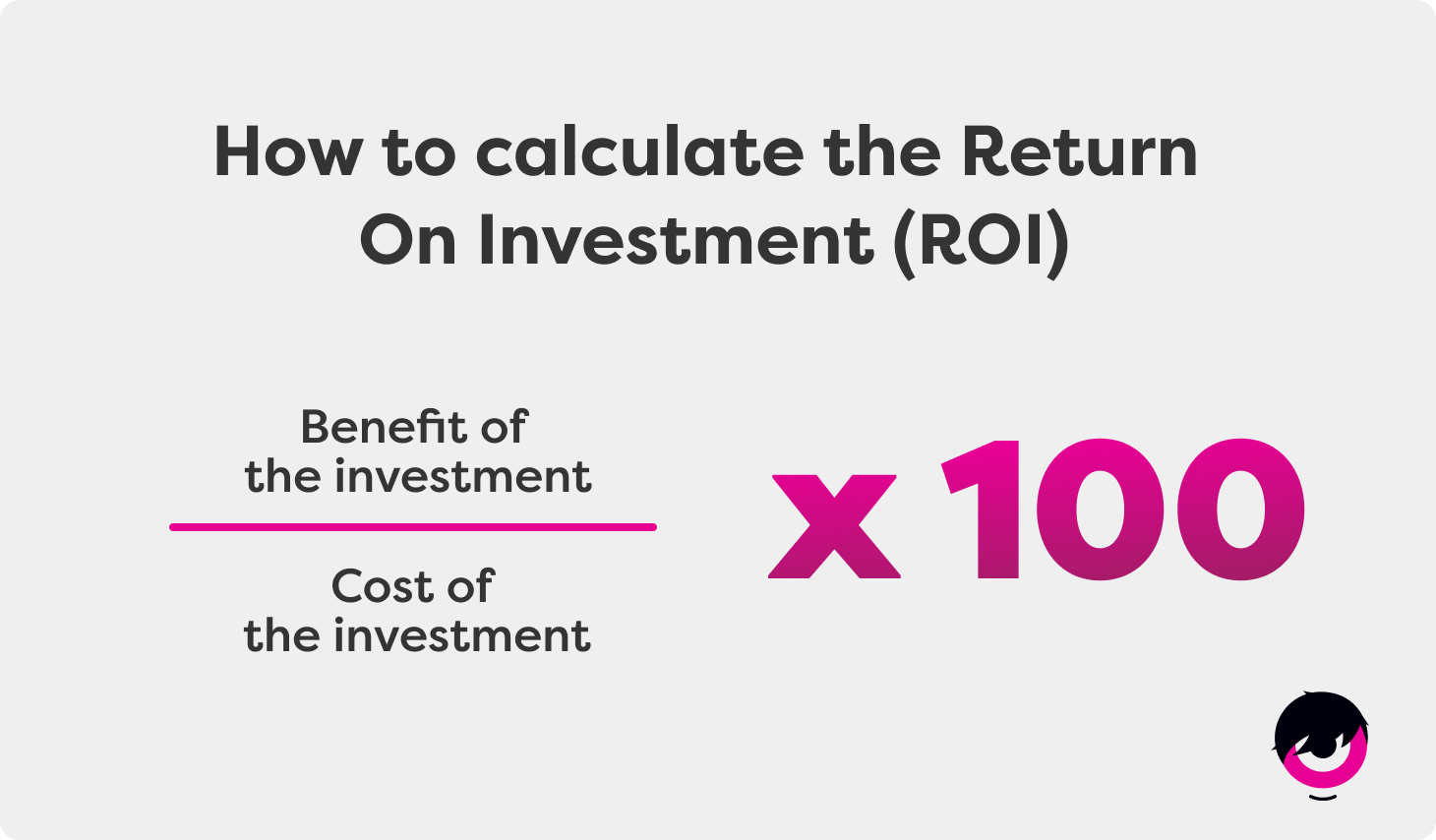
ROI (Return on Investment) measures how much value you get back relative to what you spent. The formula is straightforward:
ROI = [(Financial Gains − Cost of Investment) ÷ Cost of Investment] × 100
For an HRIS (Human Resources Information System), the costs to factor in include:
- Monthly or annual subscription fees
- Time spent on implementation and configuration
- Employee training time (HR team + managers)
- Any data migration or IT support costs
The gains to measure come from:
- Hours saved on manual, repetitive HR admin tasks
- Lower employee turnover and its associated replacement costs
- Fewer payroll errors and compliance-related penalties
- Improved manager and HR productivity across the board
The challenge? These gains vary significantly based on your company size, industry, current processes, and existing turnover rate. A generic calculation rarely reflects your actual situation, which is why a custom estimate matters more than an industry average. Our HR software ROI calculator lets you plug in your real headcount, average salary, and current turnover rate to generate a personalized savings estimate in under 2 minutes.
The Real Financial Benefits of HR Software: Breaking Down Each Gain
1. Time Savings on HR Administrative Work
This is the most immediate and measurable benefit. An HRIS automates the tasks that quietly eat up your HR team’s week: data entry, leave request approvals, compliance reminders, document collection, onboarding checklists, report generation.
What this looks like in dollars:
Based on data collected from our clients, implementing an all-in-one HR platform can recover up to 800 hours per year, translating to roughly $25,000 in annual payroll savings.
To put that in perspective: if your HR manager currently spends 20% of their week on tasks that could be automated, that’s nearly a full day every week reclaimed for higher-value work (strategic recruiting, employee development, retention initiatives).
2. Reduced Employee Turnover
Turnover is one of the most significant — and most underestimated — costs in any organization. Replacing a single employee typically costs between 50% and 200% of their annual salary when you account for recruiting, onboarding, training, and the productivity dip during the transition period.
An HRIS directly reduces turnover by improving:
- Structured onboarding: New hires who go through a consistent, organized onboarding process are significantly more likely to stay beyond the one-year mark.
- Performance management: Regular check-ins, goal tracking, and feedback loops keep employees engaged and surface issues before they become resignations.
- Manager visibility: When managers have real-time access to employee data, they can act on early warning signs instead of reacting after the fact.
What this looks like in dollars:
Our client data shows HRIS implementation reduces turnover by 5–15%. For a 120-person company with an average salary of $60,000 CAD, that reduction translates to over $41,000 in annual savings.
3. Payroll Accuracy and Compliance Risk Reduction
Manual HR processes, especially when payroll, time tracking, and absence management aren’t connected, create conditions for costly errors. Miscalculated overtime, missed statutory holiday pay, outdated employee records: each of these has both a direct cost (fixing errors, reprocessing payroll) and an indirect cost (employee trust, potential regulatory penalties).
Centralizing your HR data on a single platform dramatically reduces these risks. For Canadian organizations specifically, keeping up with provincial employment standards, ESA requirements, and Quebec-specific labour laws is significantly easier when your HRIS flags exceptions automatically.
4. Manager and Team Productivity Gains
The ROI of HR software doesn’t stop at the HR department. Managers across every team benefit when HR processes are streamlined:
- Leave approvals that used to require emails and spreadsheet updates now happen in two clicks
- Employee information is always current and accessible without going through HR
- Onboarding tasks for new hires are assigned and tracked automatically
- Reports and headcount data are available on demand for business planning
These gains are harder to quantify but compound across every manager in the organization, particularly as headcount grows.
How Long Does It Take to See a Return on Investment?
This is usually the first question a CFO or CEO asks. Based on what we observe with our clients’ experience:
- Administrative time savings begin immediately: most organizations feel the impact within the first few weeks of going live.
- The break-even point typically occurs within a few months to the end of the first year, depending on implementation complexity and current process maturity.
- Turnover-related savings accumulate throughout year one and compound in subsequent years as retention improves.
It’s important to note that the faster path to ROI comes when:
- Your current processes are highly manual (more automation = faster gains)
- Your turnover rate is above your industry average (more room to improve)
- Your HR team is stretched thin (time savings are most impactful when capacity is already constrained)
How to Calculate Your Specific ROI: Two Options
Your industry, workforce profile, current turnover, and existing processes all affect your actual ROI — sometimes dramatically. Fortunately, you have two options to choose from to get a more accurate picture of the potential return on investment of HR software for your company :
Option 1 — The interactive calculator (fast, self-serve)
Our HR software ROI calculator lets you enter your own headcount, average HR salary, current turnover rate, and weekly hours spent on admin tasks. It generates your personalized savings estimate in real time — no sign-up required.
Option 2 — A personalized ROI audit (precise, expert-guided)
Want a number you can actually bring to a board meeting? Our team can walk through your specific situation (your current processes, actual turnover costs, industry benchmarks) and build a tailored ROI projection for your organization.
It’s free and it gives you exactly the ammunition you need to present a compelling business case to your leadership team.
Quick Reference: Key ROI Figures at a Glance
Here are numbers you can actually bring to a board meeting!


| Metric | Average Observed Outcome | |
|---|---|---|
| Annual admin hours recovered | Up to 800 hours/year | |
| Estimated payroll savings | ~$25,000/year | |
| Turnover rate reduction | 5–15% | |
| Turnover cost savings (120 employees) | ~$41,000/year | |
| Time to break-even | Weeks to a few months |
Resource published by